Quote for the Week

"Learn to enjoy every moment of your life"

Tuesday, October 30, 2018

What's New in .Net Core?

Microsoft .NET Core Version 2.1, a cross-platform implementation of the company’s .Net development platform, has been released, featuring improvements to build time performance and tools deployment. Version 2.0 will reach end-of-life status on September 1, 2018, and patches will no longer be provided for it.

And Microsoft expects to ship .Net Core 3 in 2019, with the first beta expected later in 2018.

Features of .NET Core


Yes, as it is the new generation .NET framework, it contains all features of .NET framework + its own new features, let’s go through them

  • Cross platform support : .NET Core is supporting development of apps that can be deployed beyond windows platform, we can deploy our apps on Linux or on MacOS.
  • Containers and Dockers support : Containers and dockers are very famous in these days, they can be easily adaptable by cloud technologies, Don’t worry .NET Core has full support of these components.
  • Performance Improvement.
  • MVC and web API merged : Before .NET Core, Developer needs to use MVC and Web API separately to create REST services using JSON, but .NET Core does job more simpler and merged them in a single module.
  • Seamless support to Microservices.
  • Command line development possible on Windows, MacOS, Linux.
  • It support adjacent .NET versions per applications.
Now let’s discuss the road ahead for .NET Core 2.1:-

Build-Time Performance: For the developers into .NET Application Development this will be bring good news as build-time performance has been improved in .NET Core 2.1 especially for incremental build. These improvements valid for both .NET build on the command line and to builds in Visual Studio. Microsoft has also made improvements in the CLI tools and in the MSBuild in order to make the tools deliver much faster experience to the developers.

.NET Core Global Tools: In .NET Core 2.1, it will include a new deployment and extensibility mechanism for tools. This new experience is similar to Node global tools. Microsoft has used the same syntax and experience. .NET Core tools are .NET Core console apps which are packaged and acquired as NuGet packages. These tools are framework dependent application by default and include all of the NuGet dependencies. This implies that a given global tool will run on any OS or chip architecture by default. Microsoft expects a whole new ecosystem of tools to establish itself for .NET. Some of these tools will be specific to .NET Core development and many of them will be general in nature.

HttpClient Performance: Outgoing network requests are important part of application performance for microservices and other types of application. .NET Core 2.1 has a new HttpClient handler which is rewritten for high performance. Microsoft is also including a IHtt[ClientFactory fearture that provides circuit breaker and other services for HttpClient calls. This new feature has been built on top of the new HttpClient handler.

Windows Compatibility Pack: When you port existing code from the .NET framework to .NET Core, you can use the new Windows compatibility pack. It provides access to an additional 20,000 APIs more than what is available in .NET Core. This includes System.Drawing, EventLog, Performance Counters, Windows Services an EventLog.

Summary

We have discussed some of the new features which are being added into .Net Core 2.1 by Microsoft. Till now the feedback and experience of the developers has been great. These improvements will make the .NET Core development even more easier and make the applications run more faster while using less memory.

Tuesday, May 15, 2018

ORM(Object Relational Mapping) in .NET

An Object Relation Mapping(ORM) library helps developers to create data access applications by programming against a conceptual model instead of programming against a relational database model.  ORMs bring lot of advantages and few of the prominent ones are -  RDBMS independent data access layer development, rapid application development, huge reduction in code, auto generation of boilerplate methods for CRUD operations and abstract access to data.

I have collected some of ORMs which can used for developing .Net Applications -


LLBLGen Pro Runtime Framework


The LLBLGen Pro Runtime Framework is an optional ORM that works in conjunction with the LLBLGen entity modeling tool. We say it’s optional because LLBLGen can also work with other ORMs such as Entity Framework.


Like Entity Framework, the LLBLGen Pro Runtime Framework is full OOP style ORM. But it differs in several ways, the first being an emphasis on performance. Though EF Core is significantly faster than classic Entity Framework, both are still considerably slower than other ORMs. Frans Bouma, author of LLBLGen Pro, hosts a performance shootout comparing materialization speed of various .NET data access / ORM implementations.


The LLBLGen Pro Runtime Framework also differs from EF/EF Core in that it is not context-bound. Each entity tracks its own changes, allowing you to manipulate an object graph in memory without holding a context open. (Which will make your DBA happy because not holding an open context also means you aren’t holding an open connection, which would otherwise interfere with database connection pooling.)


Like most ORMs for .NET Core, there are some limitations with the Core version of LLBLGen Pro Runtime Framework. However, this is mostly limited to missing features in .NET Core itself such as TransactionScope not being supported by SqlClient or fewer objects being binary serializable.

Microsoft Entity Framework


Entity Framework is one of the most advanced and feature rich ORM library from Microsoft.  Using the Entity Framework, developers can write data access code using the popular LINQ queries to retrieve and manipulate data as strongly typed objects. The Entity Framework’s ORM supports change tracking, identity resolution, lazy loading and query translation so that developers can focus on building their application specific business logic rather than wring thousands of lines of code for fundamental data access.

The Entity Framework is built on top of  ADO.NET provider model and it integrates very well with Visual Studio. It supports Domain model and Code First model and have providers for various databases like Sql Server, SQL Azure, Oracle, MySql and DB2.

NHibernate


NHibernate is the .NET sibling of popular Java ORM framework Hibernate. If you are looking for an ORM library outside of Microsoft provided libraries, NHibernate is the most probable candidate you would end up choosing. NHibernate  is a mature, open source ORM framework which is actively developed, fully featured, highly performant and successfully used in thousands of projects.


This framework is being developed for over a decade by community members and used in thousands of commercial and open source applications. NHibernate uses XML description of entities and relationships, automatically generates SQL for retrieving and manipulating data. Optionally you can describe mappings metadata with attributes in source code.

Microsoft LINQ to SQL


LINQ to SQL is another Microsoft ORM library which was released before Entity Framework. Before shipping Entity Framework, Microsoft heavily promoted Linq To Sql and it is used in many .NET applications. The LINQ to SQL provider allows LINQ to query SQL Server databases to retrieve and manipulate data as strongly typed objects. Basically it’s a semi-ORM which is meant for Sql Server and if you are looking for building generic data access code that works on any database, then Linq to Sql is not the choice for you.

ORMapster


ORMapster for Visual Studio 2013 is a simple ORM data mapper and code generator extension that does one thing: iI reads your data source and creates a data access layer with LINQ self-tracking entities. That's it. The resulting data entities can then be used in your projects, including WCF, ASP.NET MVC, Web Forms, Windows Forms and so on.


ORMapster integrates directly with Visual Studio, and versions are available for Visual Studio 2010 through 2013. To work with the LINQ entities created by ORMapster, you'll also need the ORMapster Framework NuGet package.


There's a handy Getting Started guide on the ORMapster Web site that walks you through building a data model based on the beloved Northwind sample database. Also, although there's pretty much no documentation explaining it, you might check out the ORMapster Web UI NuGet package, which appears to be a DataSourceControl optimized for data binding with ORMapster-generated entities.


There are few other less known libraries available and used in few projects – AutoMapper, EntitySpaces.NET, LightSpeed etc. For a comprehensive list of .NET ORM libraries.

Which one is the best?


Hmm... this is a tough question to answer as it highly depends on the projects to say which ORM is best for a .NET project. There are various factors we need to consider before nailing down on the ORM – availability of developer pool with a specific ORM knowledge, size, performance & scalability requirements of the target application, level of support required and  time to market factors.


In the list of available ORM libraries Microsoft Entity Framework & NHibernate stands out in the crowd. If you organization is a fan or open source community and looking for a well oiled and proven library then you should consider NHibernate.


On the other side, Microsoft is heavily investing in developing Entity Framework and in the past couple of years 5 iterations has been released.  It’s one of the most actively developed and well optimized ORM library that plays well any of the .NET technologies. The future for Entity Framework looks very promising as the big boss Microsoft is driving it. There is a good developer community available in the market with Entity Framework skills.


So, according to points above and based on your requirements choose between Entity Framework or NHibernate.

Tuesday, June 27, 2017

ELMAH Exception Logging Integration in MVC

In this article, Let us see what is ELMAH..

WHAT IS ELMAH?

ELMAH stands for Error Logging Modules And Handlers that provide functionality to logging run time ASP.NET errors.

  •  Enables logging of all unhandled exceptions.
  •  logs all errors in many storages, like - SQL Server, MySQL, Random Access Memory (RAM), SQL Lite, and Oracle.
  • It has functionality to download all errors in CSV file.
  • RSS feed for the last 15 errors
  • Get all error data in JSON or XML format
  • Get all errors to our mailbox
  • Send error log notification to your application
  • Customize the error log by customizing some code.

Implementing into MVC Application

1. Install ELMAH using Nuget package manager into your application.


2.  Configure your web.config with  ELMAH attributes like below:


<?xml version="1.0" encoding="utf-8"?>  
    <!--  
For more information on how to configure your ASP.NET application, please visit  
http://go.microsoft.com/fwlink/?LinkId=301880  
-->  
    <configuration>  
        <configSections>  
            <!-- For more information on Entity Framework configuration, visit http://go.microsoft.com/fwlink/?LinkID=237468 -->  
            <section name="entityFramework" type="System.Data.Entity.Internal.ConfigFile.EntityFrameworkSection, EntityFramework, Version=6.0.0.0, Culture=neutral, PublicKeyToken=b77a5c561934e089" requirePermission="false" />  
            <sectionGroup name="elmah">  
                <section name="security" requirePermission="false" type="Elmah.SecuritySectionHandler, Elmah" />  
                <section name="errorLog" requirePermission="false" type="Elmah.ErrorLogSectionHandler, Elmah" />  
                <section name="errorMail" requirePermission="false" type="Elmah.ErrorMailSectionHandler, Elmah" />  
                <section name="errorFilter" requirePermission="false" type="Elmah.ErrorFilterSectionHandler, Elmah" />  
            </sectionGroup>  
        </configSections>  
        <connectionStrings>  
            <add name="DefaultConnection" connectionString="Data Source=.;Initial Catalog=ExceptionLog;Integrated Security=True" providerName="System.Data.SqlClient" />  
        </connectionStrings>  
        <appSettings>  
            <add key="webpages:Version" value="3.0.0.0" />  
            <add key="webpages:Enabled" value="false" />  
            <add key="ClientValidationEnabled" value="true" />  
            <add key="UnobtrusiveJavaScriptEnabled" value="true" />  
            <add key="elmah.mvc.disableHandler" value="false" />  
            <add key="elmah.mvc.disableHandleErrorFilter" value="false" />  
            <add key="elmah.mvc.requiresAuthentication" value="false" />  
            <add key="elmah.mvc.IgnoreDefaultRoute" value="false" />  
            <add key="elmah.mvc.allowedRoles" value="*" />  
            <add key="elmah.mvc.allowedUsers" value="*" />  
            <add key="elmah.mvc.route" value="elmah" />  
            <add key="elmah.mvc.UserAuthCaseSensitive" value="true" />  
        </appSettings>  
        <system.web>  
            <authentication mode="None" />  
            <compilation debug="true" targetFramework="4.5.1" />  
            <httpRuntime targetFramework="4.5.1" />  
  
            <!--add this-->  
            <httpHandlers>  
                <add verb="POST,GET,HEAD" path="elmah.axd" type="Elmah.ErrorLogPageFactory, Elmah" />  
            </httpHandlers>  
  
            <!--add this-->  
            <httpModules>  
                <add name="ErrorLog" type="Elmah.ErrorLogModule, Elmah" />  
                <add name="ErrorMail" type="Elmah.ErrorMailModule, Elmah" />  
                <add name="ErrorFilter" type="Elmah.ErrorFilterModule, Elmah" />  
            </httpModules>  
        </system.web>  
        <system.webServer>  
            <!--add this-->  
            <handlers>  
                <add name="Elmah" verb="POST,GET,HEAD" path="elmah.axd" type="Elmah.ErrorLogPageFactory, Elmah" />  
            </handlers>  
            <!--add this-->  
            <modules>  
                <remove name="FormsAuthentication" />  
                <add name="ErrorLog" type="Elmah.ErrorLogModule, Elmah" preCondition="managedHandler" />  
                <add name="ErrorMail" type="Elmah.ErrorMailModule, Elmah" preCondition="managedHandler" />  
                <add name="ErrorFilter" type="Elmah.ErrorFilterModule, Elmah" preCondition="managedHandler" />  
            </modules>  
            <validation validateIntegratedModeConfiguration="false" />  
  
        </system.webServer>  
        <runtime>  
            <assemblyBinding xmlns="urn:schemas-microsoft-com:asm.v1">  
                <dependentAssembly>  
                    <assemblyIdentity name="Microsoft.Owin" publicKeyToken="31bf3856ad364e35" />  
                    <bindingRedirect oldVersion="0.0.0.0-3.0.0.0" newVersion="3.0.0.0" />  
                </dependentAssembly>  
                <dependentAssembly>  
                    <assemblyIdentity name="Microsoft.Owin.Security.OAuth" publicKeyToken="31bf3856ad364e35" />  
                    <bindingRedirect oldVersion="0.0.0.0-3.0.0.0" newVersion="3.0.0.0" />  
                </dependentAssembly>  
                <dependentAssembly>  
                    <assemblyIdentity name="Microsoft.Owin.Security.Cookies" publicKeyToken="31bf3856ad364e35" />  
                    <bindingRedirect oldVersion="0.0.0.0-3.0.0.0" newVersion="3.0.0.0" />  
                </dependentAssembly>  
                <dependentAssembly>  
                    <assemblyIdentity name="Microsoft.Owin.Security" publicKeyToken="31bf3856ad364e35" />  
                    <bindingRedirect oldVersion="0.0.0.0-3.0.0.0" newVersion="3.0.0.0" />  
                </dependentAssembly>  
                <dependentAssembly>  
                    <assemblyIdentity name="Newtonsoft.Json" culture="neutral" publicKeyToken="30ad4fe6b2a6aeed" />  
                    <bindingRedirect oldVersion="0.0.0.0-6.0.0.0" newVersion="6.0.0.0" />  
                </dependentAssembly>  
                <dependentAssembly>  
                    <assemblyIdentity name="System.Web.Helpers" publicKeyToken="31bf3856ad364e35" />  
                    <bindingRedirect oldVersion="1.0.0.0-3.0.0.0" newVersion="3.0.0.0" />  
                </dependentAssembly>  
                <dependentAssembly>  
                    <assemblyIdentity name="System.Web.Mvc" publicKeyToken="31bf3856ad364e35" />  
                    <bindingRedirect oldVersion="0.0.0.0-5.2.2.0" newVersion="5.2.2.0" />  
                </dependentAssembly>  
                <dependentAssembly>  
                    <assemblyIdentity name="System.Web.Optimization" publicKeyToken="31bf3856ad364e35" />  
                    <bindingRedirect oldVersion="1.0.0.0-1.1.0.0" newVersion="1.1.0.0" />  
                </dependentAssembly>  
                <dependentAssembly>  
                    <assemblyIdentity name="System.Web.WebPages" publicKeyToken="31bf3856ad364e35" />  
                    <bindingRedirect oldVersion="1.0.0.0-3.0.0.0" newVersion="3.0.0.0" />  
                </dependentAssembly>  
                <dependentAssembly>  
                    <assemblyIdentity name="WebGrease" publicKeyToken="31bf3856ad364e35" />  
                    <bindingRedirect oldVersion="0.0.0.0-1.5.2.14234" newVersion="1.5.2.14234" />  
                </dependentAssembly>  
            </assemblyBinding>  
        </runtime>  
        <entityFramework>  
            <defaultConnectionFactory type="System.Data.Entity.Infrastructure.LocalDbConnectionFactory, EntityFramework">  
                <parameters>  
                    <parameter value="mssqllocaldb" />  
                </parameters>  
            </defaultConnectionFactory>  
            <providers>  
                <provider invariantName="System.Data.SqlClient" type="System.Data.Entity.SqlServer.SqlProviderServices, EntityFramework.SqlServer" />  
            </providers>  
        </entityFramework>  
        <elmah>  
  
            <!--add this-->  
            <!--. If allowRemoteAccess value is set to 0, then the error log web page can only be viewed locally. If this attribute is set to 1 then the error log web page is enabled for both remote and local visitors.-->  
            <security allowRemoteAccess="0" />  
            <errorLog type="Elmah.SqlErrorLog, Elmah" connectionStringName="DefaultConnection" />  
            <!--add this-->  
        </elmah>  
  
    </configuration>  


3. Now, Let us create a table to log the errors :

CREATE TABLE[dbo].[ELMAH_Error]  
(  
  
    [ErrorId][uniqueidentifier] NOT NULL,  
  
    [Application][nvarchar](60) NOT NULL,  
  
    [Host][nvarchar](50) NOT NULL,  
  
    [Type][nvarchar](100) NOT NULL,  
  
    [Source][nvarchar](60) NOT NULL,  
  
    [Message][nvarchar](500) NOT NULL,  
  
    [User][nvarchar](50) NOT NULL,  
  
    [StatusCode][int] NOT NULL,  
  
    [TimeUtc][datetime] NOT NULL,  
  
    [Sequence][int] IDENTITY(1, 1) NOT NULL,  
  
    [AllXml][ntext] NOT NULL  
  
)  


Create below Stored Procedures :

Create PROCEDURE[dbo].[ELMAH_GetErrorsXml]  
  
(  
    @Application NVARCHAR(60),  
    @PageIndex INT = 0,  
    @PageSize INT = 15,  
    @TotalCount INT OUTPUT  
  
)  
  
AS  
  
SET NOCOUNT ON  
  
DECLARE @FirstTimeUTC DATETIME  
DECLARE @FirstSequence INT  
DECLARE @StartRow INT  
DECLARE @StartRowIndex INT  
SELECT  
  
@TotalCount = COUNT(1)  
  
FROM  
  
    [ELMAH_Error]  
  
WHERE  
  
    [Application] = @Application  
SET @StartRowIndex = @PageIndex * @PageSize + 1  
IF @StartRowIndex <= @TotalCount  
  
BEGIN  
  
SET ROWCOUNT @StartRowIndex  
  
SELECT  
  
@FirstTimeUTC = [TimeUtc],  
  
    @FirstSequence = [Sequence]  
  
FROM  
  
    [ELMAH_Error]  
  
WHERE  
  
    [Application] = @Application  
  
ORDER BY  
  
    [TimeUtc] DESC,  
    [Sequence] DESC  
  
END  
  
ELSE  
  
BEGIN  
  
SET @PageSize = 0  
  
END  
  
SET ROWCOUNT @PageSize  
  
SELECT  
  
errorId = [ErrorId],  
  
    application = [Application],  
    host = [Host],  
    type = [Type],  
    source = [Source],  
    message = [Message],  
    [user] = [User],  
    statusCode = [StatusCode],  
    time = CONVERT(VARCHAR(50), [TimeUtc], 126) + 'Z'  
  
FROM  
  
    [ELMAH_Error] error  
  
WHERE  
  
    [Application] = @Application  
  
AND  
  
    [TimeUtc] <= @FirstTimeUTC  
  
AND  
  
    [Sequence] <= @FirstSequence  
  
ORDER BY  
  
    [TimeUtc] DESC,  
  
    [Sequence] DESC  
  
FOR  
  
XML AUTO  

Create PROCEDURE[dbo].[ELMAH_GetErrorXml]  
  
(  
  
    @Application NVARCHAR(60),  
    @ErrorId UNIQUEIDENTIFIER  
  
)  
  
AS  
  
SET NOCOUNT ON  
SELECT  
  
    [AllXml]  
FROM  
  
    [ELMAH_Error]  
WHERE  
  
    [ErrorId] = @ErrorId  
AND  
    [Application] = @Application  

Create PROCEDURE[dbo].[ELMAH_LogError]  
  
(  
  
    @ErrorId UNIQUEIDENTIFIER,    
    @Application NVARCHAR(60),    
    @Host NVARCHAR(30),    
    @Type NVARCHAR(100),  
    @Source NVARCHAR(60),    
    @Message NVARCHAR(500),  
    @User NVARCHAR(50),   
    @AllXml NTEXT,    
    @StatusCode INT,   
    @TimeUtc DATETIME  
  
)  
  
AS  
  
SET NOCOUNT ON  
  
INSERT  
  
INTO  
  
    [ELMAH_Error]
(  
  
    [ErrorId],   
    [Application],   
    [Host],  
    [Type],  
    [Source],  
    [Message],    
    [User],    
    [AllXml],    
    [StatusCode],    
    [TimeUtc]  
  
)  
  
VALUES  
  
    (  
  
    @ErrorId,  
    @Application,    
    @Host,    
    @Type,    
    @Source,   
    @Message,    
    @User,   
    @AllXml,   
    @StatusCode,   
    @TimeUtc  
  
)  


That's it, Now your application is ready to track run time errors or exception by your site.

www.<sitename>.com/elmah.axd


Sunday, April 16, 2017

What's New in Visual Studio 2017 ?

In this article, I want to bring up what are the new features added in VS 2017. Microsoft launched VS 2017 on March 07th,  2017 with many fresh and exciting features for Visual Studio developers. On February 24, 2016, Xamarin and Microsoft announced that Microsoft signed a definitive agreement to acquire Xamarin. Microsoft at Build 2016 announced that they will open-source Xamarin SDK and that they will bundle it as a free tool within Visual Studio's integrated development environment.

Now, we are celebrating the 20th anniversary of Visual Studio and one year anniversary and the release of Visual studio 2017 with many features.

There are many updates coming in the new release of Visual Studio. Unfortunately, I won’t be able to cover them all in this Visual Studio 2017 , but I’ll cover a selection of updates. Please take a look at the release notes if you want to know which other updates are in VS 2017.

Here are the ones that stood out for me:

Improved performance


Enhancements to the navigation, IntelliSense, refactoring, code fixes and debugging saves you time and effort on every-day tasks regardless of language or platform:

Visual Studio has been optimized to reduce startup time and solution load time. The very first launch of Visual Studio is at least 50% faster
Visual Studio will now monitor extension performance that impacts startup, solution load, or editing. You will receive alerts about poorly performing extensions via the Notification bar in the IDE
‘Reload all projects’ has been replaced with ‘Reload solution’ to support better performance of switching branches external to Visual Studio.

‘Run to click’ debugging


With the new ‘Run to click’ debugging feature you no longer need to set temporary breakpoints or perform several steps to execute your code and stop on the line you want. While stopped in a break state, you should see the ‘Run to click’ icon appear next to the line of code that your mouse is hovered over. Simply click the icon while debugging and your code should run to that line:

    - Run to click debugging is also a great feature we chose to highlight in this Visual Studio 2017.

Using the ‘Run to click’ feature you can also view information about how fast it took for the block to execute, process memory and CPU usage. Using this you can drill down until you find out exactly where your issues are.

‘Go to All’ feature


You can now navigate through your whole project using the ‘Go to All…’ search that is replacing the ‘Navigate to…’ one. This feature can be found under Edit > Go to > Go to All… or you can use the shortcut ctrl + , or ctrl + t.

I found this search to be extremely powerful especially in bigger applications. After you enter your search query, it will show a dropdown of all the occurrences found. The powerful search looks not only at file names but also within each file and file path. As you move through the dropdown, Visual Studio will open a peek-preview in the temporary dock view to help you find what you’re looking for:

Go to all search is a powerful feature of the new Visual Studio .

‘Find all references’ feature


Updates to the ‘Find all references’ output has now made it much easier to sift your way through the results. The search output now has syntax colouring and splits all the information into their respective columns. These columns can be customized so you only see what you want in the output. Another great addition is that they added ‘Peek preview’ to the output, and hovering your mouse over the reference will show you the block of code that it was found in.


Smarter auto-complete


Adjustments to the IntelliSense autocomplete means no more scrolling through a massive list of possible recommendations. Instead it will jump straight to the most likely option. It can now also tell the difference between capital case and lower case to make using shorthand autocomplete searches even shorter.

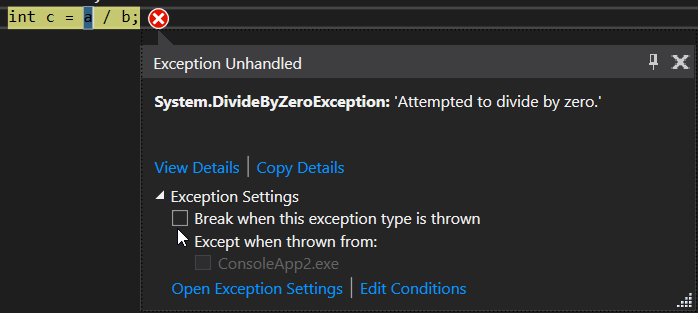
The new exception helper


The new version of Visual Studio also includes a new simplified, non-modal, exception helper. This is to help make finding out why exceptions are causing issues in your code easier. You can use this helper to easily view your exception information at glance with instant access to inner exceptions.

If you’re diagnosing a NullReference exception the helper will point out exactly what was null so you can quickly continue investigating the issue.

Using the new exception helper, you can now exclude breaking on exception types thrown from specific modules. To do this, simply click a checkbox to add a condition while stopped at the thrown exception:

'unhandled exception' is one of the benefits of Visual Studio RC 2017.


Almost I covered what I got from release notes.

Any questions, write to : dotnetcircle@gmail.com. Thank you for reading this article.

Monday, November 21, 2016

Build Mobile Apps using Xamarin and C#

As we love C# to use for building web applications and windows apps as well, if it is case why can't  we use same language to build Mobile Apps with .net framework. Microsoft comes up with new framework called Xamarin Mobile App development.


What is Xamarin?


At its extreme basic, Xamarin is a platform which can be used to build and test native cross-platform mobile apps using C# & Visual Studio. It also has its own IDE named “Xamarin Studio” which can be used as an alternative to Visual Studio. Also, it provides seamless integration with Visual Studio, compatibility with most emulators in market (AVD, Xamarin Android Player, Genymotion, etc.) and also provides abundant set of components which one can use in their project depending on their requirement.

Features


Native UI


When we start with development on cross platform apps, there are two approaches which one could choose, first is using Xamarin Forms & the other is using Xamarin Platforms. Xamarin Forms provide a common UI classes & tags which we be used common between all platforms (Win Phone, iOS & android). Whereas, the other approach involves creation of Platform specific approaches which can be helpful if we want to make use of Platform Specific classes. For instance, if one would want to use iBeacon class which is exclusively available only on iOS, we can do it in Xamarin. IOS project by making use of the iBeacon class. There can be similar requirement in either of the 3 platforms, which can be done using the same method.

Native Performance


For iOS, when the program is compiled, it sends the request to a Mac and uses its own compiler for the code written by you and converts it into the package which can then be deployed on an emulator. For Android, when the program is compiled, it sends a request to “mono,” a framework built by Xamarin as an alternative to Dalvik to boost overall application performance.

Moreover, unlike other mobile development frameworks which run the app within web-view (browser), Xamarin programs run directly on the device, which enables the application to run seamlessly on the mobile device, with minimal performance overhead.

Same day support


This is the one of the most beautiful features of Xamarin. They have successfully proven in history that Xamarin provides same day support to all new releases on any mobile platforms. This will continue even in the future.

Xamarin Testcloud


With more than 30 unique devices in iOS & 24k devices in Android, it is practically impossible to test your app in each device on UI, performance & other factors. To make it possible, Xamarin provides a feature called “Test Cloud”, in which your app is tested for all such pre-defined factors using a robotic hand. Post which a detailed report is sent to you with screenshot and exact details of error, if any.


Xamarin Insights


Once an app is built and published in the store, it is essential for a publisher to know whether users are using the app, analytics of the users, and complete details of errors/crashes when it occurs on a user device. To make this happen automatically, Xamarin facilitates us with a feature named “insights” which sends you mail alerts on crashes and also provides in-depth report on the usage of the app in real sense.


Pricing -


Detailed pricing structure can be found on the Xamarin site, however, it is available in three main categories. Namely, Starter – Indi - Business. Business and Indi are chargeable on monthly/yearly basis respectively and starter edition is Free for all. The only catch here is that it limits the app size to 128KB for starter.

Conclusion -


In a nutshell, Xamarin is exceptionally helpful and easy framework for developers with dot net background and companies who are not willing to hire more resources with separate skill sets for separate mobile frameworks. I am sure that there are many more features in Xamarin apart from the ones listed above. 

The overall costs involved in licensing are little difficult for developers to buy it on an individual level. I only hope that they come with free license for developers or increase the app size limit in Starter editions soon to encourage a much larger portion of community.