Quote for the Week

"Learn to enjoy every moment of your life"

Tuesday, June 27, 2017

ELMAH Exception Logging Integration in MVC

In this article, Let us see what is ELMAH..

WHAT IS ELMAH?

ELMAH stands for Error Logging Modules And Handlers that provide functionality to logging run time ASP.NET errors.

  •  Enables logging of all unhandled exceptions.
  •  logs all errors in many storages, like - SQL Server, MySQL, Random Access Memory (RAM), SQL Lite, and Oracle.
  • It has functionality to download all errors in CSV file.
  • RSS feed for the last 15 errors
  • Get all error data in JSON or XML format
  • Get all errors to our mailbox
  • Send error log notification to your application
  • Customize the error log by customizing some code.

Implementing into MVC Application

1. Install ELMAH using Nuget package manager into your application.


2.  Configure your web.config with  ELMAH attributes like below:


<?xml version="1.0" encoding="utf-8"?>  
    <!--  
For more information on how to configure your ASP.NET application, please visit  
http://go.microsoft.com/fwlink/?LinkId=301880  
-->  
    <configuration>  
        <configSections>  
            <!-- For more information on Entity Framework configuration, visit http://go.microsoft.com/fwlink/?LinkID=237468 -->  
            <section name="entityFramework" type="System.Data.Entity.Internal.ConfigFile.EntityFrameworkSection, EntityFramework, Version=6.0.0.0, Culture=neutral, PublicKeyToken=b77a5c561934e089" requirePermission="false" />  
            <sectionGroup name="elmah">  
                <section name="security" requirePermission="false" type="Elmah.SecuritySectionHandler, Elmah" />  
                <section name="errorLog" requirePermission="false" type="Elmah.ErrorLogSectionHandler, Elmah" />  
                <section name="errorMail" requirePermission="false" type="Elmah.ErrorMailSectionHandler, Elmah" />  
                <section name="errorFilter" requirePermission="false" type="Elmah.ErrorFilterSectionHandler, Elmah" />  
            </sectionGroup>  
        </configSections>  
        <connectionStrings>  
            <add name="DefaultConnection" connectionString="Data Source=.;Initial Catalog=ExceptionLog;Integrated Security=True" providerName="System.Data.SqlClient" />  
        </connectionStrings>  
        <appSettings>  
            <add key="webpages:Version" value="3.0.0.0" />  
            <add key="webpages:Enabled" value="false" />  
            <add key="ClientValidationEnabled" value="true" />  
            <add key="UnobtrusiveJavaScriptEnabled" value="true" />  
            <add key="elmah.mvc.disableHandler" value="false" />  
            <add key="elmah.mvc.disableHandleErrorFilter" value="false" />  
            <add key="elmah.mvc.requiresAuthentication" value="false" />  
            <add key="elmah.mvc.IgnoreDefaultRoute" value="false" />  
            <add key="elmah.mvc.allowedRoles" value="*" />  
            <add key="elmah.mvc.allowedUsers" value="*" />  
            <add key="elmah.mvc.route" value="elmah" />  
            <add key="elmah.mvc.UserAuthCaseSensitive" value="true" />  
        </appSettings>  
        <system.web>  
            <authentication mode="None" />  
            <compilation debug="true" targetFramework="4.5.1" />  
            <httpRuntime targetFramework="4.5.1" />  
  
            <!--add this-->  
            <httpHandlers>  
                <add verb="POST,GET,HEAD" path="elmah.axd" type="Elmah.ErrorLogPageFactory, Elmah" />  
            </httpHandlers>  
  
            <!--add this-->  
            <httpModules>  
                <add name="ErrorLog" type="Elmah.ErrorLogModule, Elmah" />  
                <add name="ErrorMail" type="Elmah.ErrorMailModule, Elmah" />  
                <add name="ErrorFilter" type="Elmah.ErrorFilterModule, Elmah" />  
            </httpModules>  
        </system.web>  
        <system.webServer>  
            <!--add this-->  
            <handlers>  
                <add name="Elmah" verb="POST,GET,HEAD" path="elmah.axd" type="Elmah.ErrorLogPageFactory, Elmah" />  
            </handlers>  
            <!--add this-->  
            <modules>  
                <remove name="FormsAuthentication" />  
                <add name="ErrorLog" type="Elmah.ErrorLogModule, Elmah" preCondition="managedHandler" />  
                <add name="ErrorMail" type="Elmah.ErrorMailModule, Elmah" preCondition="managedHandler" />  
                <add name="ErrorFilter" type="Elmah.ErrorFilterModule, Elmah" preCondition="managedHandler" />  
            </modules>  
            <validation validateIntegratedModeConfiguration="false" />  
  
        </system.webServer>  
        <runtime>  
            <assemblyBinding xmlns="urn:schemas-microsoft-com:asm.v1">  
                <dependentAssembly>  
                    <assemblyIdentity name="Microsoft.Owin" publicKeyToken="31bf3856ad364e35" />  
                    <bindingRedirect oldVersion="0.0.0.0-3.0.0.0" newVersion="3.0.0.0" />  
                </dependentAssembly>  
                <dependentAssembly>  
                    <assemblyIdentity name="Microsoft.Owin.Security.OAuth" publicKeyToken="31bf3856ad364e35" />  
                    <bindingRedirect oldVersion="0.0.0.0-3.0.0.0" newVersion="3.0.0.0" />  
                </dependentAssembly>  
                <dependentAssembly>  
                    <assemblyIdentity name="Microsoft.Owin.Security.Cookies" publicKeyToken="31bf3856ad364e35" />  
                    <bindingRedirect oldVersion="0.0.0.0-3.0.0.0" newVersion="3.0.0.0" />  
                </dependentAssembly>  
                <dependentAssembly>  
                    <assemblyIdentity name="Microsoft.Owin.Security" publicKeyToken="31bf3856ad364e35" />  
                    <bindingRedirect oldVersion="0.0.0.0-3.0.0.0" newVersion="3.0.0.0" />  
                </dependentAssembly>  
                <dependentAssembly>  
                    <assemblyIdentity name="Newtonsoft.Json" culture="neutral" publicKeyToken="30ad4fe6b2a6aeed" />  
                    <bindingRedirect oldVersion="0.0.0.0-6.0.0.0" newVersion="6.0.0.0" />  
                </dependentAssembly>  
                <dependentAssembly>  
                    <assemblyIdentity name="System.Web.Helpers" publicKeyToken="31bf3856ad364e35" />  
                    <bindingRedirect oldVersion="1.0.0.0-3.0.0.0" newVersion="3.0.0.0" />  
                </dependentAssembly>  
                <dependentAssembly>  
                    <assemblyIdentity name="System.Web.Mvc" publicKeyToken="31bf3856ad364e35" />  
                    <bindingRedirect oldVersion="0.0.0.0-5.2.2.0" newVersion="5.2.2.0" />  
                </dependentAssembly>  
                <dependentAssembly>  
                    <assemblyIdentity name="System.Web.Optimization" publicKeyToken="31bf3856ad364e35" />  
                    <bindingRedirect oldVersion="1.0.0.0-1.1.0.0" newVersion="1.1.0.0" />  
                </dependentAssembly>  
                <dependentAssembly>  
                    <assemblyIdentity name="System.Web.WebPages" publicKeyToken="31bf3856ad364e35" />  
                    <bindingRedirect oldVersion="1.0.0.0-3.0.0.0" newVersion="3.0.0.0" />  
                </dependentAssembly>  
                <dependentAssembly>  
                    <assemblyIdentity name="WebGrease" publicKeyToken="31bf3856ad364e35" />  
                    <bindingRedirect oldVersion="0.0.0.0-1.5.2.14234" newVersion="1.5.2.14234" />  
                </dependentAssembly>  
            </assemblyBinding>  
        </runtime>  
        <entityFramework>  
            <defaultConnectionFactory type="System.Data.Entity.Infrastructure.LocalDbConnectionFactory, EntityFramework">  
                <parameters>  
                    <parameter value="mssqllocaldb" />  
                </parameters>  
            </defaultConnectionFactory>  
            <providers>  
                <provider invariantName="System.Data.SqlClient" type="System.Data.Entity.SqlServer.SqlProviderServices, EntityFramework.SqlServer" />  
            </providers>  
        </entityFramework>  
        <elmah>  
  
            <!--add this-->  
            <!--. If allowRemoteAccess value is set to 0, then the error log web page can only be viewed locally. If this attribute is set to 1 then the error log web page is enabled for both remote and local visitors.-->  
            <security allowRemoteAccess="0" />  
            <errorLog type="Elmah.SqlErrorLog, Elmah" connectionStringName="DefaultConnection" />  
            <!--add this-->  
        </elmah>  
  
    </configuration>  


3. Now, Let us create a table to log the errors :

CREATE TABLE[dbo].[ELMAH_Error]  
(  
  
    [ErrorId][uniqueidentifier] NOT NULL,  
  
    [Application][nvarchar](60) NOT NULL,  
  
    [Host][nvarchar](50) NOT NULL,  
  
    [Type][nvarchar](100) NOT NULL,  
  
    [Source][nvarchar](60) NOT NULL,  
  
    [Message][nvarchar](500) NOT NULL,  
  
    [User][nvarchar](50) NOT NULL,  
  
    [StatusCode][int] NOT NULL,  
  
    [TimeUtc][datetime] NOT NULL,  
  
    [Sequence][int] IDENTITY(1, 1) NOT NULL,  
  
    [AllXml][ntext] NOT NULL  
  
)  


Create below Stored Procedures :

Create PROCEDURE[dbo].[ELMAH_GetErrorsXml]  
  
(  
    @Application NVARCHAR(60),  
    @PageIndex INT = 0,  
    @PageSize INT = 15,  
    @TotalCount INT OUTPUT  
  
)  
  
AS  
  
SET NOCOUNT ON  
  
DECLARE @FirstTimeUTC DATETIME  
DECLARE @FirstSequence INT  
DECLARE @StartRow INT  
DECLARE @StartRowIndex INT  
SELECT  
  
@TotalCount = COUNT(1)  
  
FROM  
  
    [ELMAH_Error]  
  
WHERE  
  
    [Application] = @Application  
SET @StartRowIndex = @PageIndex * @PageSize + 1  
IF @StartRowIndex <= @TotalCount  
  
BEGIN  
  
SET ROWCOUNT @StartRowIndex  
  
SELECT  
  
@FirstTimeUTC = [TimeUtc],  
  
    @FirstSequence = [Sequence]  
  
FROM  
  
    [ELMAH_Error]  
  
WHERE  
  
    [Application] = @Application  
  
ORDER BY  
  
    [TimeUtc] DESC,  
    [Sequence] DESC  
  
END  
  
ELSE  
  
BEGIN  
  
SET @PageSize = 0  
  
END  
  
SET ROWCOUNT @PageSize  
  
SELECT  
  
errorId = [ErrorId],  
  
    application = [Application],  
    host = [Host],  
    type = [Type],  
    source = [Source],  
    message = [Message],  
    [user] = [User],  
    statusCode = [StatusCode],  
    time = CONVERT(VARCHAR(50), [TimeUtc], 126) + 'Z'  
  
FROM  
  
    [ELMAH_Error] error  
  
WHERE  
  
    [Application] = @Application  
  
AND  
  
    [TimeUtc] <= @FirstTimeUTC  
  
AND  
  
    [Sequence] <= @FirstSequence  
  
ORDER BY  
  
    [TimeUtc] DESC,  
  
    [Sequence] DESC  
  
FOR  
  
XML AUTO  

Create PROCEDURE[dbo].[ELMAH_GetErrorXml]  
  
(  
  
    @Application NVARCHAR(60),  
    @ErrorId UNIQUEIDENTIFIER  
  
)  
  
AS  
  
SET NOCOUNT ON  
SELECT  
  
    [AllXml]  
FROM  
  
    [ELMAH_Error]  
WHERE  
  
    [ErrorId] = @ErrorId  
AND  
    [Application] = @Application  

Create PROCEDURE[dbo].[ELMAH_LogError]  
  
(  
  
    @ErrorId UNIQUEIDENTIFIER,    
    @Application NVARCHAR(60),    
    @Host NVARCHAR(30),    
    @Type NVARCHAR(100),  
    @Source NVARCHAR(60),    
    @Message NVARCHAR(500),  
    @User NVARCHAR(50),   
    @AllXml NTEXT,    
    @StatusCode INT,   
    @TimeUtc DATETIME  
  
)  
  
AS  
  
SET NOCOUNT ON  
  
INSERT  
  
INTO  
  
    [ELMAH_Error]
(  
  
    [ErrorId],   
    [Application],   
    [Host],  
    [Type],  
    [Source],  
    [Message],    
    [User],    
    [AllXml],    
    [StatusCode],    
    [TimeUtc]  
  
)  
  
VALUES  
  
    (  
  
    @ErrorId,  
    @Application,    
    @Host,    
    @Type,    
    @Source,   
    @Message,    
    @User,   
    @AllXml,   
    @StatusCode,   
    @TimeUtc  
  
)  


That's it, Now your application is ready to track run time errors or exception by your site.

www.<sitename>.com/elmah.axd


Sunday, April 16, 2017

What's New in Visual Studio 2017 ?

In this article, I want to bring up what are the new features added in VS 2017. Microsoft launched VS 2017 on March 07th,  2017 with many fresh and exciting features for Visual Studio developers. On February 24, 2016, Xamarin and Microsoft announced that Microsoft signed a definitive agreement to acquire Xamarin. Microsoft at Build 2016 announced that they will open-source Xamarin SDK and that they will bundle it as a free tool within Visual Studio's integrated development environment.

Now, we are celebrating the 20th anniversary of Visual Studio and one year anniversary and the release of Visual studio 2017 with many features.

There are many updates coming in the new release of Visual Studio. Unfortunately, I won’t be able to cover them all in this Visual Studio 2017 , but I’ll cover a selection of updates. Please take a look at the release notes if you want to know which other updates are in VS 2017.

Here are the ones that stood out for me:

Improved performance


Enhancements to the navigation, IntelliSense, refactoring, code fixes and debugging saves you time and effort on every-day tasks regardless of language or platform:

Visual Studio has been optimized to reduce startup time and solution load time. The very first launch of Visual Studio is at least 50% faster
Visual Studio will now monitor extension performance that impacts startup, solution load, or editing. You will receive alerts about poorly performing extensions via the Notification bar in the IDE
‘Reload all projects’ has been replaced with ‘Reload solution’ to support better performance of switching branches external to Visual Studio.

‘Run to click’ debugging


With the new ‘Run to click’ debugging feature you no longer need to set temporary breakpoints or perform several steps to execute your code and stop on the line you want. While stopped in a break state, you should see the ‘Run to click’ icon appear next to the line of code that your mouse is hovered over. Simply click the icon while debugging and your code should run to that line:

    - Run to click debugging is also a great feature we chose to highlight in this Visual Studio 2017.

Using the ‘Run to click’ feature you can also view information about how fast it took for the block to execute, process memory and CPU usage. Using this you can drill down until you find out exactly where your issues are.

‘Go to All’ feature


You can now navigate through your whole project using the ‘Go to All…’ search that is replacing the ‘Navigate to…’ one. This feature can be found under Edit > Go to > Go to All… or you can use the shortcut ctrl + , or ctrl + t.

I found this search to be extremely powerful especially in bigger applications. After you enter your search query, it will show a dropdown of all the occurrences found. The powerful search looks not only at file names but also within each file and file path. As you move through the dropdown, Visual Studio will open a peek-preview in the temporary dock view to help you find what you’re looking for:

Go to all search is a powerful feature of the new Visual Studio .

‘Find all references’ feature


Updates to the ‘Find all references’ output has now made it much easier to sift your way through the results. The search output now has syntax colouring and splits all the information into their respective columns. These columns can be customized so you only see what you want in the output. Another great addition is that they added ‘Peek preview’ to the output, and hovering your mouse over the reference will show you the block of code that it was found in.


Smarter auto-complete


Adjustments to the IntelliSense autocomplete means no more scrolling through a massive list of possible recommendations. Instead it will jump straight to the most likely option. It can now also tell the difference between capital case and lower case to make using shorthand autocomplete searches even shorter.

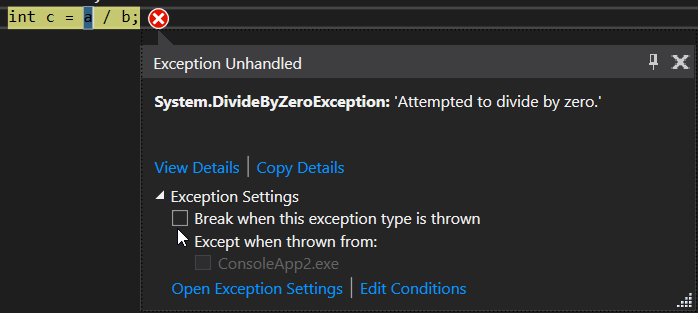
The new exception helper


The new version of Visual Studio also includes a new simplified, non-modal, exception helper. This is to help make finding out why exceptions are causing issues in your code easier. You can use this helper to easily view your exception information at glance with instant access to inner exceptions.

If you’re diagnosing a NullReference exception the helper will point out exactly what was null so you can quickly continue investigating the issue.

Using the new exception helper, you can now exclude breaking on exception types thrown from specific modules. To do this, simply click a checkbox to add a condition while stopped at the thrown exception:

'unhandled exception' is one of the benefits of Visual Studio RC 2017.


Almost I covered what I got from release notes.

Any questions, write to : dotnetcircle@gmail.com. Thank you for reading this article.

Monday, November 21, 2016

Build Mobile Apps using Xamarin and C#

As we love C# to use for building web applications and windows apps as well, if it is case why can't  we use same language to build Mobile Apps with .net framework. Microsoft comes up with new framework called Xamarin Mobile App development.


What is Xamarin?


At its extreme basic, Xamarin is a platform which can be used to build and test native cross-platform mobile apps using C# & Visual Studio. It also has its own IDE named “Xamarin Studio” which can be used as an alternative to Visual Studio. Also, it provides seamless integration with Visual Studio, compatibility with most emulators in market (AVD, Xamarin Android Player, Genymotion, etc.) and also provides abundant set of components which one can use in their project depending on their requirement.

Features


Native UI


When we start with development on cross platform apps, there are two approaches which one could choose, first is using Xamarin Forms & the other is using Xamarin Platforms. Xamarin Forms provide a common UI classes & tags which we be used common between all platforms (Win Phone, iOS & android). Whereas, the other approach involves creation of Platform specific approaches which can be helpful if we want to make use of Platform Specific classes. For instance, if one would want to use iBeacon class which is exclusively available only on iOS, we can do it in Xamarin. IOS project by making use of the iBeacon class. There can be similar requirement in either of the 3 platforms, which can be done using the same method.

Native Performance


For iOS, when the program is compiled, it sends the request to a Mac and uses its own compiler for the code written by you and converts it into the package which can then be deployed on an emulator. For Android, when the program is compiled, it sends a request to “mono,” a framework built by Xamarin as an alternative to Dalvik to boost overall application performance.

Moreover, unlike other mobile development frameworks which run the app within web-view (browser), Xamarin programs run directly on the device, which enables the application to run seamlessly on the mobile device, with minimal performance overhead.

Same day support


This is the one of the most beautiful features of Xamarin. They have successfully proven in history that Xamarin provides same day support to all new releases on any mobile platforms. This will continue even in the future.

Xamarin Testcloud


With more than 30 unique devices in iOS & 24k devices in Android, it is practically impossible to test your app in each device on UI, performance & other factors. To make it possible, Xamarin provides a feature called “Test Cloud”, in which your app is tested for all such pre-defined factors using a robotic hand. Post which a detailed report is sent to you with screenshot and exact details of error, if any.


Xamarin Insights


Once an app is built and published in the store, it is essential for a publisher to know whether users are using the app, analytics of the users, and complete details of errors/crashes when it occurs on a user device. To make this happen automatically, Xamarin facilitates us with a feature named “insights” which sends you mail alerts on crashes and also provides in-depth report on the usage of the app in real sense.


Pricing -


Detailed pricing structure can be found on the Xamarin site, however, it is available in three main categories. Namely, Starter – Indi - Business. Business and Indi are chargeable on monthly/yearly basis respectively and starter edition is Free for all. The only catch here is that it limits the app size to 128KB for starter.

Conclusion -


In a nutshell, Xamarin is exceptionally helpful and easy framework for developers with dot net background and companies who are not willing to hire more resources with separate skill sets for separate mobile frameworks. I am sure that there are many more features in Xamarin apart from the ones listed above. 

The overall costs involved in licensing are little difficult for developers to buy it on an individual level. I only hope that they come with free license for developers or increase the app size limit in Starter editions soon to encourage a much larger portion of community.

Thursday, September 22, 2016

WCF vs ASP.NET Web API


I spent three months to learn the concepts of WCF and Web API,  what is difference between them and which one should to prefer for our application. Let's see :

WCF :


As we know WCF stands for Windows Communication Foundation which enables building services that supports multiple transport protocols (HTTP, TCP, UDP and custom transports) and allows switching between them where we can build secure, reliable service that can integrate across the platforms and inter operate smoothly.

Asp.net Web API  :


Well, it is also a framework that is used to make HTTP services. As you know, now a days we are using mobiles, tablets, apps and different types of services, so Web API is a simple and reliable platform to create HTTP enabled services that can reach wide range of clients. It is used to create complete REST services.

RESTful Services


REST stands for Representational State Transfer.  REST is an architectural pattern for creating services. REST architectural pattern specifies a set of constraints that a system should adhere some specific constraints like Client server communication , stateless, Cacheable, Uniform interface that will play GET, PUT,  POST, DELETE

By Default, Web API supports RESTful services and for WCF need to configure.You have an existing SOAP service, you must support but want to add REST to reach more client but it is more complicate to implement REST because WCF needs more configuration to set up and it is headache.

WCF over Web API


  • Choose WCF when you want to create a service that should support special scenarios such as one way messaging, message queues, duplex communication etc.
  • Choose WCF when you want to create a service that can use fast transport channels when available, such as TCP, Named Pipes, or maybe even UDP (in WCF 4.5), and you also want to support HTTP when all other transport channels are unavailable.
  • Choose Web API when you want to create a resource-oriented services over HTTP that can use the full features of HTTP (like URIs, request/response headers, caching, versioning, various content formats).
  • Choose Web API when you want to expose your service to a broad range of clients including browsers, mobiles, iphone and tablets.


Hope you got cleared with which is best one to choose for your application.

Feedback or queries?

mail to : dotnetcircle@gmail.com


Tuesday, March 8, 2016

How to get table names in given pattern in Sql Server

Many a times I come across a scenario where I will be remembering only part of the table name and need to find the complete table name. Traversing through hundreds of tables in the database and finding the exact table is boring, tedious time consuming job. In such scenarios we can use on of the below three approaches, I always use the first one as it is easy for me to remember. Let me know which approach which you use and reason for the same.

To demo this create a sample database with three tables by the below script:

CREATE DATABASE SqlHintsDemoDB
GO
USE SqlHintsDemoDB
GO
CREATE TABLE dbo.Customers (CustId INT, Name NVARCHAR(50))
CREATE TABLE dbo.CustomerOrders (OrderId INT, CustId INT)
CREATE TABLE dbo.Employee(EmpId INT, Name NVARCHAR(50))
GO


Approach 1: Using sp_tables


We can use sp_tables statement like below to find all the tables in the database whose name contains the word cust in it. Like

sp_tables '%cust%'

Result :


Approach 2: Using sys.Tables


We can use sys.tables catalog view like below to find all the tables in the database whose name contains the word cust in it.


SELECT * FROM sys.Tables
WHERE name LIKE '%cust%'


Result:

Table Name Like in Sql Server Using sys.tables


Approach 3: Using information_schema.tables


We can use information_schema.tables information schema view like below to find all the tables in the database whose name contains the word cust in it.


SELECT * FROM information_schema.tables
WHERE table_name  LIKE '%cust%'

Result : 

Table Name Like in Sql Server Using information_schema.tables